The Friends & Family test for Crazy Wall is well underway. I’m happy so many of you have joined me, and while I can’t see who is using the app at any given moment — I know who you are, and I’m grateful.
Also, welcome to those of you joining me here on the website. Hello, world! Yessir, a good old-fashioned weblog, or “blog” as I like to say. Here’s where I’d like to post release notes, and whatnot, plus the occasional link for your crazy walls that I think are yarn-worthy.
Now, onto some release notes for build #7 of the beta test.
So, if this build over the past few days has been about anything, it’s about exposing stuff. No, not like that. But you do you. I’m talking about finding things again. Here’s what I got:
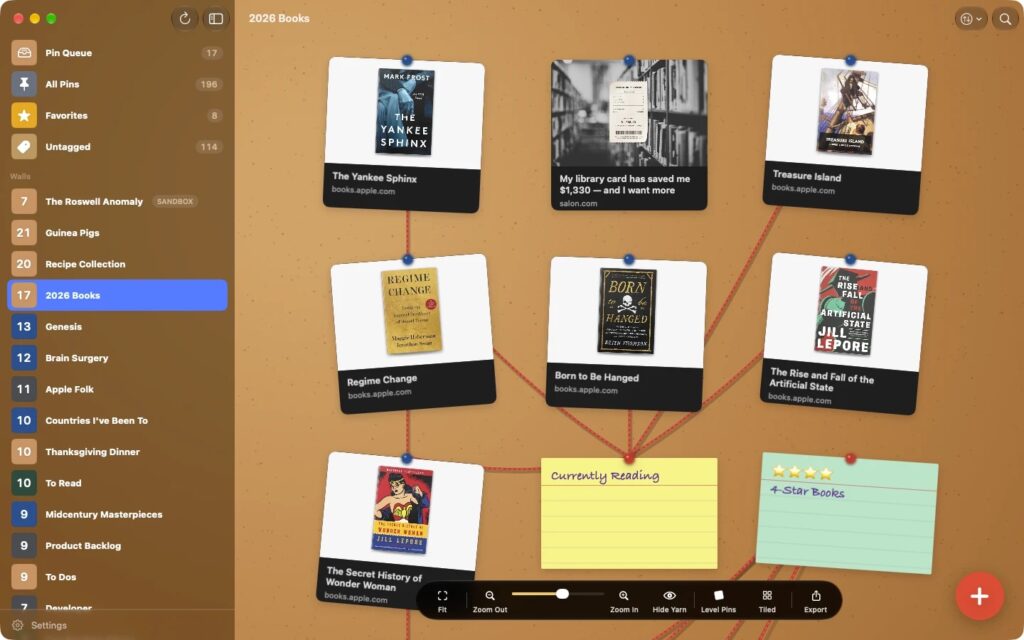
- Favorites. Love a pin? Give it a gold star! Star it from its menu, or from the share sheet as you save it. All your favorites are gathered on a new wall in the sidebar, while each pin stays on its own wall.
- Tappable tags. The tags on your cards are buttons now. Tap one to see every pin with that tag, from all your walls, on one board.
- All Pins & Untagged. Two new walls in the sidebar. All Pins shows everything you’ve saved, newest first. Untagged shows the pins still waiting for a tag, which makes it a good place to tidy up. You can hide either one if you want.
- Select on any wall. On iPhone and iPad, tap Select, pick a few cards, and move them to another wall together. On the Mac, use ⌘-click, ⇧-click or ⌘A. Need somewhere new to put them? The wall picker can make a new wall on the spot.
Also: a card now levels off under its pin when you touch it or mouse-over, like a crooked sticky on a real bulletin board.
Please tell me what you think. Welcome to Crazy Wall!
C. A.