Another test build is here, y’all. #8. We’re getting close to the finish line, everyone. I’m trying to scoop up the last 20% of work into the box, that, and you know this is true, takes 80% of the time.
60% of the time? It works every time.
You’d imagine Crazy Wall is really good at holding onto your links, right? This build lets your cards hold onto your words. Alright, I’m not going to dig too deep to find the theme in this release. I think it’s important when a sprint or chunk of work reflects a common theme. I like to think of the work often in big categories and chunks.
Well, here are the chunks I got this time:
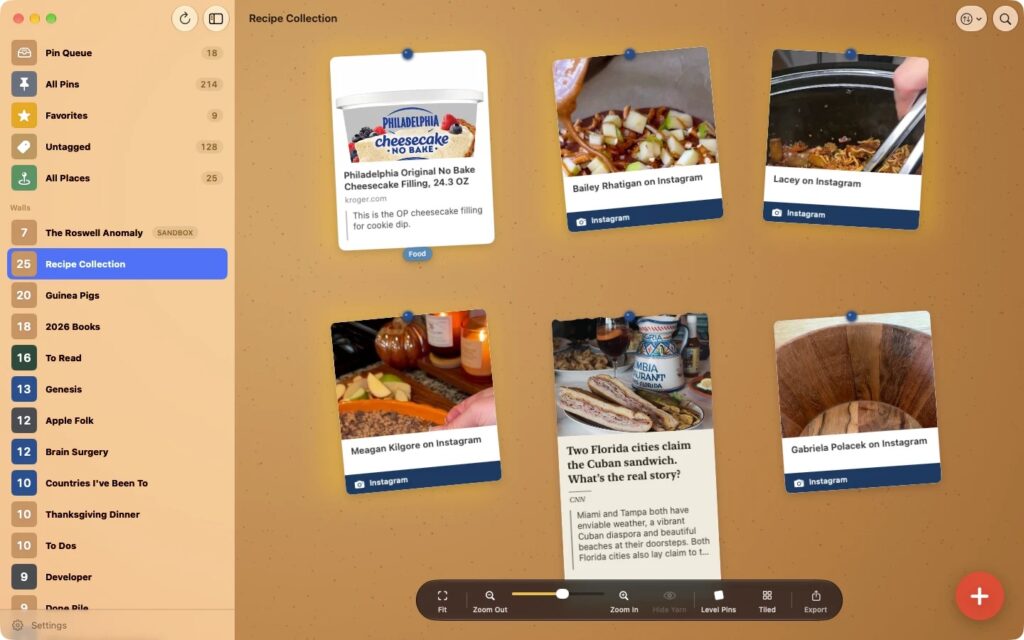
- Notes on cards. Every link and place can now carry a line of your own at the bottom of the card. Why you saved it, who told you about it, what to order there.
- Keep the quote. Reading something in Safari and a line jumps out at you? Highlight it, tap Share, and pick Crazy Wall. The card keeps what you highlighted, right under the title.
- All Places. A new wall in the sidebar containing all the place links you’ve saved all in one place. Select Worldview and see them all on one map.
- Podcasts. Share an episode from Apple Podcasts and it gets a podcast themed card of its own. You can share podcasts from the share sheet in Apple’s Podcasts app.
- Export options. A wall’s Export button is a menu now. Now with Export as Bookmarks, which saves the wall’s links and places as an HTML bookmarks file that other browsers can import.
- Export everything. This is an important one because I want customer data to be 100% portable. I don’t want anyone to feel like they’re stranded or stuck with the app. So, you can get a .zip file of your bookmarks (HTML), feeds (OPML) and index cards (Markdown).
I’ve made some enhancements to tag walls (back buttons). And dragging links onto a wall on a Mac is kinda cool now also.
Please tell me what you think.
C. A.