Greetings. We meet again. Build #9 is here. If build #8 was about your cards holding onto stuff, this one is about cards you haven’t gotten around to yet.
Here’s my assumption: a lot of folks will use Crazy Wall as a read-later app. I know I have been. It’s use case #1, right? I’ve got a wall called To Read that’s been quietly judging me for several weeks now. So, this build gives those links a way to raise their hand to be read.
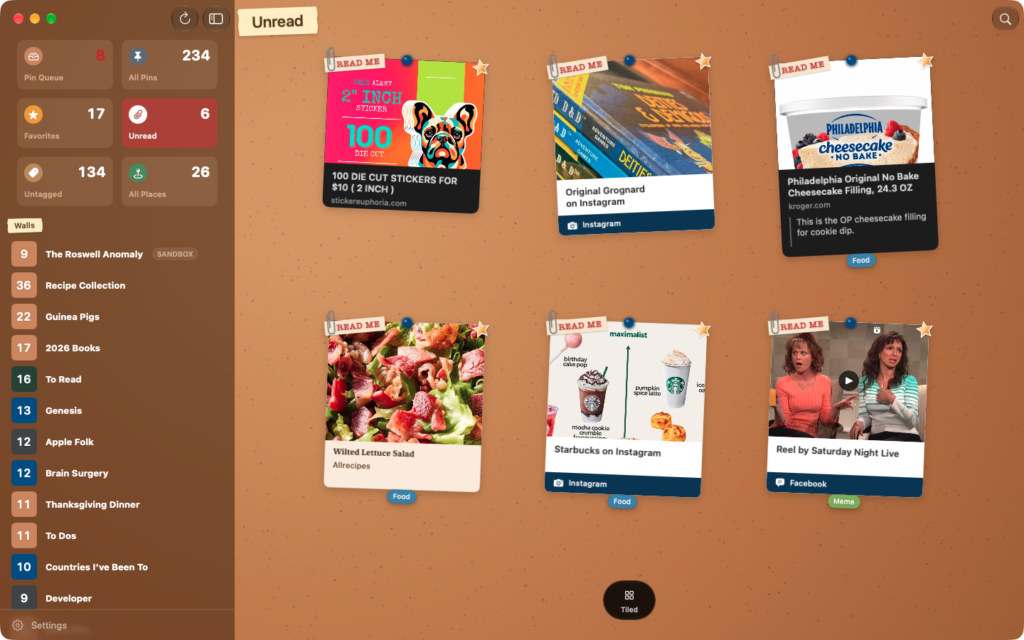
- Unread. Long-press a link and choose Mark as Unread. It gets a little manila READ ME slip, typed up in red and paperclipped to the corner of the card. Open the link and the clip comes off. Changed your mind? Mark it Unread again as often as you want.
- Unread wall. Every unread link from every wall, all in one place, in its own brick-red tile in the sidebar. Hide it in Settings if you’d rather not.
- Save it as Unread. The share sheet has an Unread switch now, right under Favorite. Save it for later, for real this time.
- AI summaries in the Reader (Labs). Turn on Settings → Crazy Wall Labs → Show AI summaries in Reader, and articles you open in the Reader get a short summary above the text. It’s written on your device by Apple Intelligence, and the article never leaves your device. It needs a device that supports Apple Intelligence, and it’s off unless you turn it on. I like this one a lot. And it’s easy to do with Apple’s on-device AI models.
A few more things while I’ve got you here:
- Stand-Up Wall. A new background: red brick, a dark room, one warm spotlight. The wall behind the mic. Your bookmarks have never looked more ready for an open mic.
- Worldview gets all the map styles. Switch between Map, Hybrid and Satellite from the corner of the Worldview map.
- Song links get red thumbtacks, like places and index cards. Bookmarks get blue thumbtacks. There was a good reason for it once.
- iPad keyboards: View → Check iCloud for New Pins (⌘R), same as on the Mac.
- Fixes: the yarn bar no longer grows to three lines at big text sizes, and long wall titles fit on their tape.
Aside from that, I spent a good chunk of time testing iCloud Sync between iPhone, iPad and Mac. The question every test asks is simple: when you pick up the other device, is your stuff there? No stuff lost yet. It’s the part of the app I knew I’d spend the most time on though.
Please tell me what you think. It won’t be long until it’s ready for the App Store.
C. A.